Basic Listing
Simple directory entry
- Company
- Website
- 80-character summary
- Main category with optional subcategory
Good when you want a clean, simple listing without extra fields.
Available on: /submit.php
A visual guide to current listing, premium banner, and rotating banner options.
Use this page like a brochure. It shows what each listing type, premium banner slot, and shared rotating banner option is designed to do.
Premium banner slots are exclusive. When a premium slot is already taken, the shared rotating slot directly below it can still be available as an alternate option.
Empty public banner slots can still show house-promotional pricing and calls to action. Once a real advertiser occupies a slot, the live banner stops acting like a ToFindAI sales card and instead links out to the advertiser.
Current desktop banner uploads are enforced by slot family. Homepage premium and below-homepage slots use 970 × 250. Main Directory, Main Category, Sub Category, and Search premium and below slots use 970 × 90. Mobile guidance is currently 320 × 100.
Good when you want a clean, simple listing without extra fields.
Available on: /submit.php
Best when you want a richer listing with more room to explain what you do.
Available on: /submit.php
Best when your headline and one sharp line do the job.
Available on: /submit.php
Useful when the buyer needs one or two extra cues before clicking.
Available on: /submit.php
Best when your offer needs a little more explanation without becoming a page takeover.
Available on: /submit.php
Good when you want one clear banner position without building a larger campaign.
Available on: /sponsor.php
Creative note: Upload sizes are currently enforced by slot family. Homepage banner families use 970 × 250 desktop. Main Directory, Main Category, Sub Category, and Search banner families use 970 × 90 desktop. Mobile guidance is currently 320 × 100.
These are the main top, middle, and bottom banner positions across the homepage, Main Directory, Main Category, Sub Category, and Search families.
Available on: /sponsor.php and /sponsor-multi.php
Below slots follow the same page family as the premium slot above them, including the same current creative size family.
Available on: /sponsor.php and /sponsor-multi.php
This keeps open inventory visible while making sure a paid sponsor’s banner is focused on their destination once the slot is live.
Available on: public banner surfaces across the site
If you switch to a different banner family later, the previously accepted image may stop working because the new slot requires a different exact desktop size.
Available on: /sponsor.php, /sponsor-multi.php, and /manage-sponsorship.php
Best when you want several banner touchpoints working together.
Available on: /sponsor-multi.php
Creative note: Each selected banner slot must use the exact desktop size required for that slot family. Homepage families use 970 × 250. Main Directory, Main Category, Sub Category, and Search families use 970 × 90. Mobile guidance is currently 320 × 100.
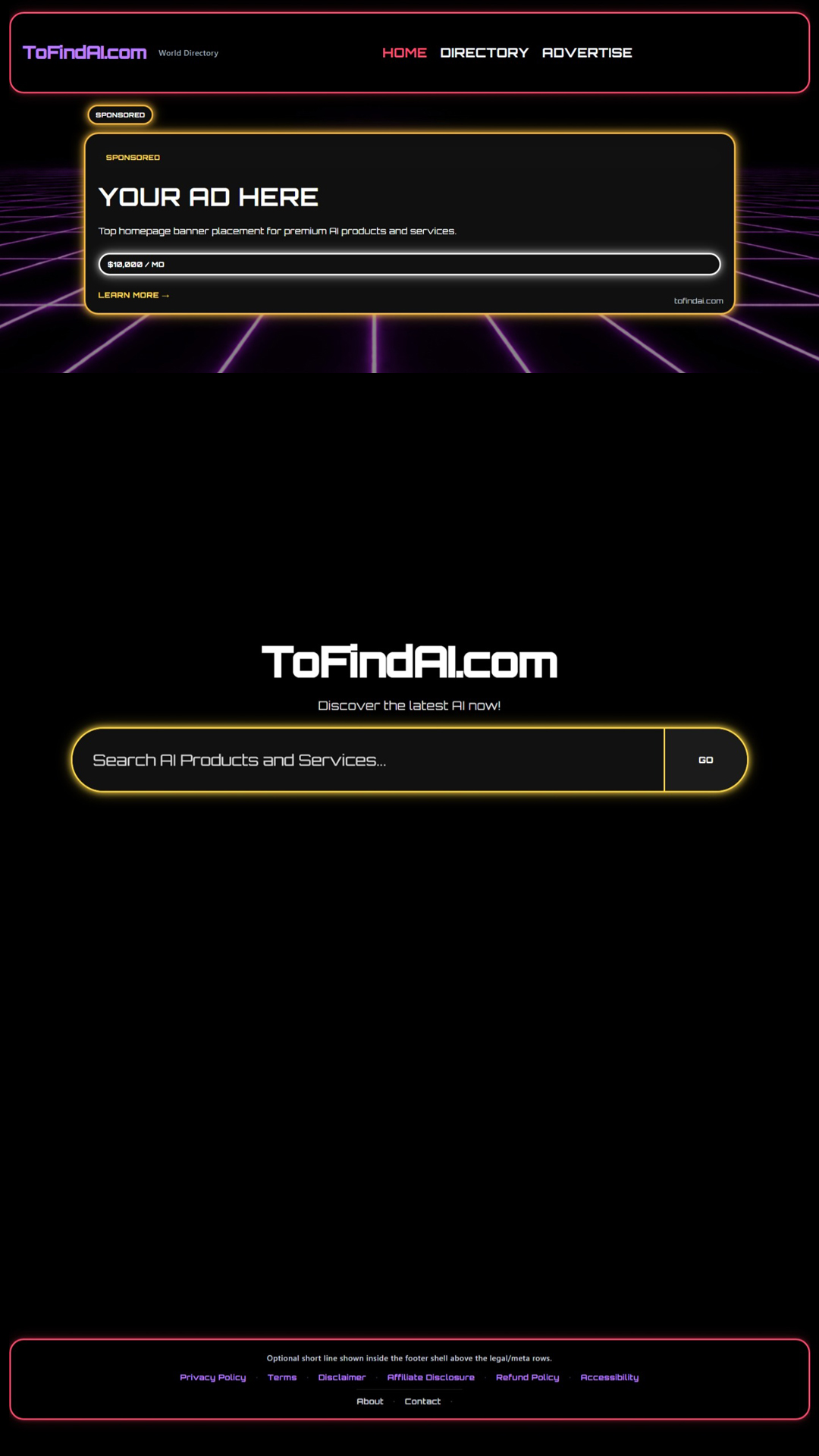
Great when you want to be seen before visitors start browsing deeper.
Available on: /sponsor.php and /sponsor-multi.php
Creative size: 970 × 250 desktop. Mobile guidance: 320 × 100.
Availability: Premium homepage slot. If it is sold, the shared rotating Below Homepage Top slot can still be offered beneath it.
A nice middle-ground option for home page visibility.
Available on: /sponsor.php and /sponsor-multi.php
Creative size: 970 × 250 desktop. Mobile guidance: 320 × 100.
Availability: Premium homepage slot. If it is sold, the shared rotating Below Homepage Middle slot can still be offered beneath it.
Useful when you want another home-page presence at a lower tier.
Available on: /sponsor.php and /sponsor-multi.php
Creative size: 970 × 250 desktop. Mobile guidance: 320 × 100.
Availability: Premium homepage slot. If it is sold, the shared rotating Below Homepage Bottom slot can still be offered beneath it.
Best when you want top placement inside a chosen category.
Available on: /sponsor.php and /sponsor-multi.php
Creative size: 970 × 90 desktop. Mobile guidance: 320 × 100.
Availability: Premium Main Category slot. If it is sold, the shared rotating Below Main Category Top slot can still be offered beneath it.
Useful when you want another category-page touchpoint without taking the top spot.
Available on: /sponsor.php and /sponsor-multi.php
Creative size: 970 × 90 desktop. Mobile guidance: 320 × 100.
Availability: Premium Main Category slot. If it is sold, the shared rotating Below Main Category Middle slot can still be offered beneath it.
Good for extra visibility deeper on category pages.
Available on: /sponsor.php and /sponsor-multi.php
Creative size: 970 × 90 desktop. Mobile guidance: 320 × 100.
Availability: Premium Main Category slot. If it is sold, the shared rotating Below Main Category Bottom slot can still be offered beneath it.
Best when you want the strongest banner position inside a specific sub category.
Available on: /sponsor.php and /sponsor-multi.php
Creative size: 970 × 90 desktop. Mobile guidance: 320 × 100.
Availability: Premium Sub Category slot. If it is sold, the shared rotating Below Sub Category Top slot can still be offered beneath it.
Useful when you want another banner touchpoint inside a focused sub category.
Available on: /sponsor.php and /sponsor-multi.php
Creative size: 970 × 90 desktop. Mobile guidance: 320 × 100.
Availability: Premium Sub Category slot. If it is sold, the shared rotating Below Sub Category Middle slot can still be offered beneath it.
Good when you want a lower-page banner inside a specific sub category.
Available on: /sponsor.php and /sponsor-multi.php
Creative size: 970 × 90 desktop. Mobile guidance: 320 × 100.
Availability: Premium Sub Category slot. If it is sold, the shared rotating Below Sub Category Bottom slot can still be offered beneath it.
Great when you want to show up where visitors are already searching for something specific.
Available on: /sponsor.php and /sponsor-multi.php
Creative size: 970 × 90 desktop. Mobile guidance: 320 × 100.
Availability: Premium Search slot. If it is sold, the shared rotating Below Search Top slot can still be offered beneath it.
Great when you want early visibility across directory browsing.
Available on: /sponsor.php and /sponsor-multi.php
Creative size: 970 × 90 desktop. Mobile guidance: 320 × 100.
Availability: Premium Main Directory slot. If it is sold, the shared rotating Below Main Directory Top slot can still be offered beneath it.
A solid choice for broad directory visibility in the middle of the page.
Available on: /sponsor.php and /sponsor-multi.php
Creative size: 970 × 90 desktop. Mobile guidance: 320 × 100.
Availability: Premium Main Directory slot. If it is sold, the shared rotating Below Main Directory Middle slot can still be offered beneath it.
Useful when you want one more broad directory touchpoint.
Available on: /sponsor.php and /sponsor-multi.php
Creative size: 970 × 90 desktop. Mobile guidance: 320 × 100.
Availability: Premium Main Directory slot. If it is sold, the shared rotating Below Main Directory Bottom slot can still be offered beneath it.